Scene Handle
Bootstrap
To start the scene automatically on the Build application, tick the Auto-bootstrap option in the CityEntryPoint (in the Editor, the scene loads by default).

CityEntryPoint.

SceneBootstrap.
If you want to start the scene with code, assign CityEntryPoint with SceneBootstrap script to your script & use follow method, example:
[SerializeField] private SceneBootstrapBase sceneBootstrapBase;

private void StartInit()
{
        sceneBootstrapBase.StartInitilization();
}
Use this code if you need to know when the bootstrap is complete, example:
[SerializeField] private SceneBootstrapBase sceneBootstrapBase;

private void Start()
{
        sceneBootstrapBase.OnComplete += SceneBootstrap_OnComplete;
}

private void SceneBootstrap_OnComplete()
{
        // Custom logic.
}
Scene Unload
Since version 1.6.0, entities are unloaded from the subscene automatically. If you need to unload a scene manually, read on.
Find EntityWorldService on the scene & untick Auto destroy entity scene option.
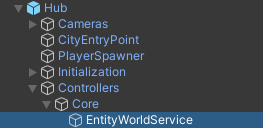
Assign EntityWorldService to your script.
You can use this sample code:
[SerializeField] private EntityWorldService entityWorldService;

private void Dispose()
{
        entityWorldService.DisposeWorld();
}
Or use simply use:
EntityWorldService.Instance.DisposeWorld();