Common Configs

Common Configs

General Settings Config

Config to quickly on/off optional features.

Where To Find

_images/GeneralSettingsOnScene.png

Config Example

_images/GeneralSettingsConfig.png

Traffic Car Settings

Has traffic : on/off traffic vehicle in the city.
Traffic baking type:
  • Editor subscene : all traffic entities are converted at editor subscene time.

  • Runtime : all traffic entities are converted at runtime.

Change lane support : on/off feature to change lanes for traffic.
Traffic public support : on/off public traffic vehicle in the city.
Antistuck support : on/off antistuck feature for traffic vehicles.
Avoidance support : on/off avoidance of the vehicles.
Car hit collision reaction : on/off traffic collision reaction to other traffic cars.
Wheel system support : on/off simple wheel system for traffic vehicles.

Pedestrian Settings

Has pedestrian : on/off pedestrians in the city.
Pedestrian baking type:
  • Editor subscene : all pedestrian entities are converted at editor subscene time.

  • Runtime : all pedestrian entities are converted at runtime.

Pedestrian trigger system support : on/off trigger feature for pedestrians (fear running due bullets etc…).
Navigation support : on/off navigation systems for pedestrians.

Other Settings

World simulation type:
  • DOTS : simulation of traffic & pedestrians entirely in DOTS space.

  • Hybrid mono : physics simulation run on Monobehaviour scripts, but input taken from DOTS entities simulation.

Physics simulation type:
  • No physics : dots physics off.

  • Unity physics : Unity dots physics on.

  • Havok physics : Havok dots physics on (havok physical package is required).

Cull physics : on/off culling of the physics of dynamic objects that are far from the player.
Cull static physics :on/off culling of the physics of static objects that are far from the player.
Force legacy physics : force enable built-in physics , otherwise built-in physics will be disabled when ragdoll is disabled.
Health system support : on/off health systems for all entities (vehicles, pedestrians, etc…).
Props damage system support : on/off damage systems for props.

Sound Configs

Common Sound Config

_images/CommonSoundConfig.png
Has sounds : on/off DOTS sound systems.
Crowd sound : on/off crowd sound system for pedestrians.
Random horns sound : on/off horn sound system for traffic.

Crowd Sound Config

Сonfig for crowd background sound. The sound of the crowd is calculated based on of two areas: the inner circle and the outer circle. The sound in the inner circle is louder than the sound in the outer circle.
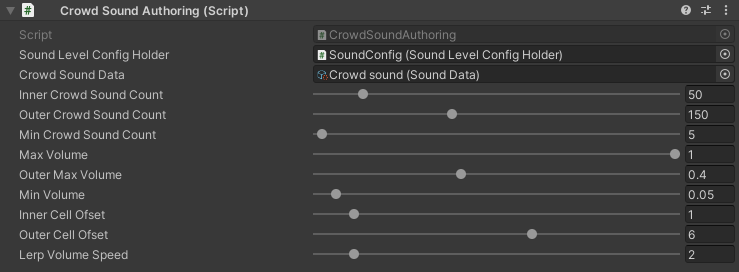
_images/CrowdSoundConfig.png
Crowd sound data : crowd sound data.
Inner crowd sound count : maximum volume for a given number of pedestrians in the inner circle.
Outer crowd sound count : maximum volume for a given number of pedestrians in the outer circle.
Min crowd sound count : minimum number of pedestrians to play the crowd sound.
Max volume : maximum volume level for the crowd sound.
Outer max volume : maximum volume in the outer circle.
Min volume : minimum volume level for the crowd sound.
Inner cell offset : offset of neighbouring cells relative to current cell in hashmap in the inner circle.
Outer cell offset : offset of neighbouring cells relative to current cell in hashmap in the outer circle.
Lerp volume speed : speed of sound volume change between current value and target value.
