User Custom Solution
This topic about how to replace the player with a custom user solution.
Player Character
If you want your own script to spawn player character, follow these steps:
Set the World simulation type to Hybrid mono in the General settings config.
Set the Player controller type to Custom in the General settings config.
Disable built-in camera on the scene (this step is irrelevant if you are using the Hub Base instead of the Hub).

Make sure your camera has a cull point object as a child (set local position to zero).
Add the HybridEntityRuntimeAuthoring component to your prefab.
Add Copy Transform From Game Object, Player Npc components in the Hybrid components list.
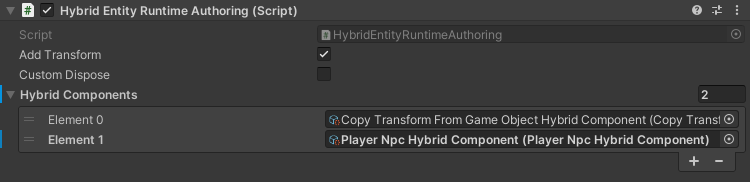
If you haven’t created your own scene yet, you can try the Demo Mono scene for tests.
Custom player only works with Hybrid Mono vehicles.
Your player prefab character is ready.
Player Car
If you want your own script to spawn player car, follow these steps:
Set the World simulation type to Hybrid mono in the General settings config.
Set the Player controller type to Custom in the General settings config (this step is irrelevant if you are using the Hub Base instead of the Hub).
Disable built-in camera on the scene (this step is irrelevant if you are using the Hub Base instead of the Hub).
Make sure your camera has a cull point object as a child (set local position to zero).
Make sure that you created & selected Hybrid mono traffic.
Add the HybridEntityRuntimeAuthoring component to your prefab.
Add Copy Transform From Game Object, Custom Raycast Target , PlayerCar components in the Hybrid components list.
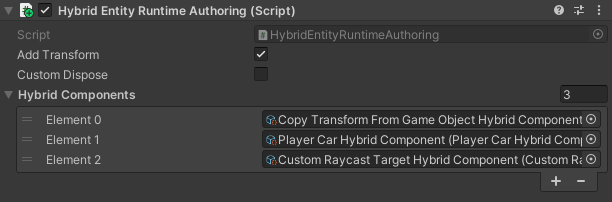
Add the Bounds runtime authoring & Velocity runtime authoring components to your prefab. (optional step)

Bounds component example.

Velocity component example.
Make sure that the traffic Raycast config includes a player car layer.
If you haven’t created your own scene yet, you can try the Demo Mono scene for tests.
Custom player car only works with Hybrid Mono vehicles.
Your player prefab car is ready.