Traffic Configs

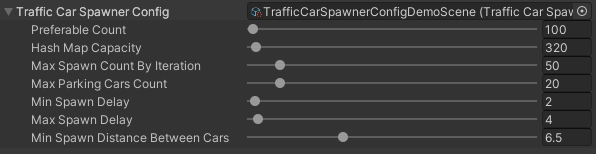
Traffic Car Spawner Config
_images/TrafficCarSpawnerConfig.png

Hub/Configs/TrafficCarConfigs/CommonConfig

Preferable count : maximum number of cars in the city.
HashMap capacity : initial capacity of the hashmap that contains the data of the traffic cars.
Max spawn count by iteration : maximum number of cars that will be spawned in one iteration.
Min/Max spawn delay : minimum/maximum duration between spawns.
Min spawn distance : minimum distance for spawning between cars.

Traffic Car Settings

_images/TrafficCarSettingsConfig.png

Hub/Configs/TrafficCarConfigs/CommonConfig

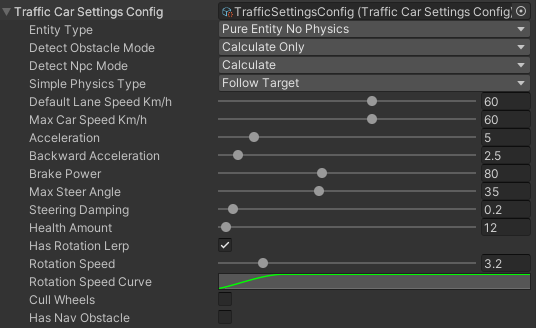
Entity Type

Detect Obstacle Mode

  • Hybrid : combine types Calculate and Raycast.

  • Calculate only : mathematically calculates the obstacle.

  • Raycast only : detect obstacle by raycast (more info).

    Note

    In Hybrid mode, raycast is activated only when the selected targets are close to the car (more info).

Detect Npc Mode

  • Disabled

  • Calculate : mathematically calculates the npc.

  • Raycast : detect obstacle by raycast (npc should have PhysicsShape component).

Simple Physics Movement Type

  • Car input : simple emulation of real movement based on traffic input.

  • Follow target : the vehicle rotation is set based on the destination direction.

Common Settings

Default lane speed km/h : default lane speed (if the lane speed limit is set to 0 the default speed will be selected).
Health count : number of hit points of the car (health systems should be enabled).

Simple Vehicle Settings

Max car speed km/h : maximum speed of the car.
Acceleration magnitude : vehicle acceleration speed.
Backward acceleration magnitude : backward vehicle acceleration speed.
Brake power : brake power.
Max steer angle : max steer angle of the wheels.
Steering damping : wheel turn speed.
Has rotation lerp :
  • Rotation speed : vehicle rotation speed.

  • Rotation speed curve : curve on the dependence of the speed of the car on its speed.

Custom Vehicle Settings

Braking input rate : braking rate if current vehicle speed limit is greater than speed limit.

Other Settings

Cull physics : off physics for the vehicle if they are outside the camera.
Cull wheels : on/off wheel handling if they are outside the camera.
Has nav obstacle : on/off navmesh obstacles for traffic config.

Traffic Nav Config

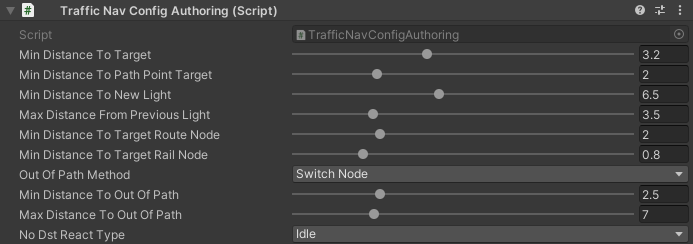
Config distance to target nodes and traffic light handlers.
_images/TrafficCarNavConfigConfig.png

Hub/Configs/TrafficCarConfigs/NavConfig

Min distance to target : min distance to target TrafficNode.
Min distance to path point target : min distance to connected path point.
Min distance to new light : minimum distance to the TrafficNode entity that contains the traffic light handler entity to assign it to the car entity (if the traffic node entity does not contain a traffic light entity, the index is -1).
Min distance from previous light : minimum distance from the TrafficNode entity that contains the traffic light handler entity to unassign it from the car entity (if the traffic node entity does not contain a traffic light entity, the index is -1).
Min distance to target route node : minimum distance to switch to the next waypoint of the path.
Min distance to target rail route node : minimum distance to switch to the next waypoint of the path (rail movement only (tramc etc…)).
Out of path resolve method: resolving method in case the car is out of the path.
  • Disabled : no actions.

  • Switch node : switching to the next waypoint.

  • Backward : car will try to reach the missed waypoint by reversing.

  • Cull : car will be culled.

_images/TrafficCarNavOutOfPathConfig.png
Out of path resolve method [enabled]:
  • Min distance to out of path : minimum distance from the missed waypoint to the car.

  • Max distance to out of path : maximum distance from the missed waypoint to the car.

No Dst React Type : the reaction if there is no further destination for the cars (for example, when the road was unloaded by road streaming).

Traffic Obstacle Config

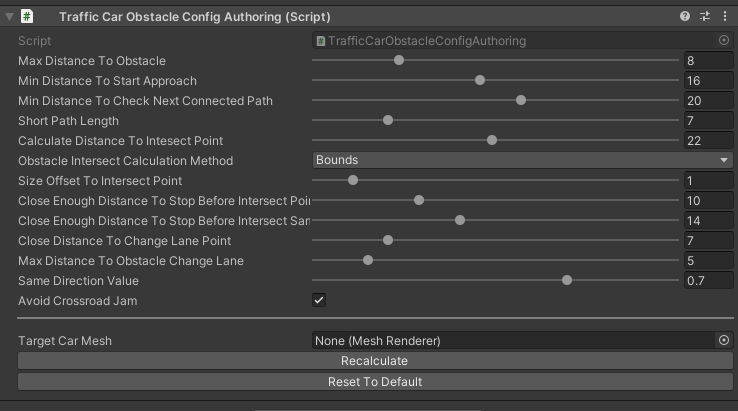
Config to calculate obstacles on the path.
_images/TrafficCarObstacleConfig.png

Hub/Configs/TrafficCarConfigs/ObstacleConfig

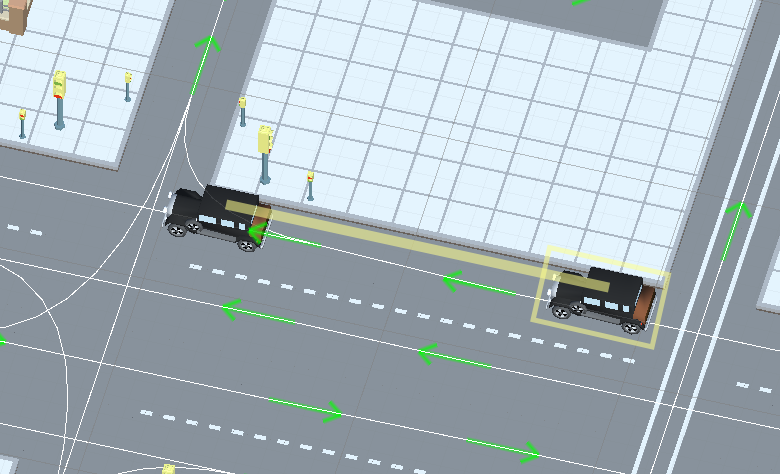
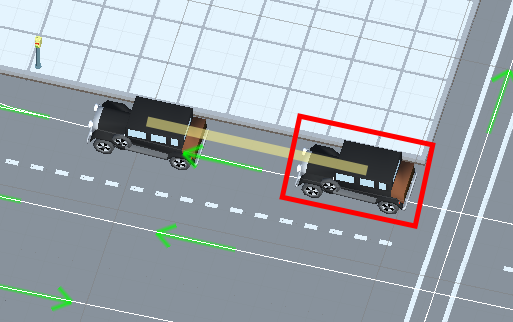
Max distance to obstacle : minimum distance to an obstacle (example) (test scene).
Min distance to start approach : minimum distance to the last car in the current lane to start (approaching) (stay at the same speed as the target car) (example) (test scene).
Min distance to start approach soft : minimum distance to the last car in the current lane to start (approaching) (long distance approach at a soft speed) (test scene).
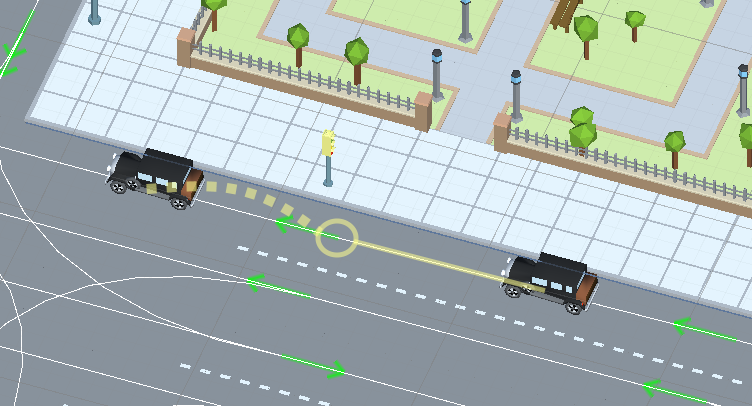
Min distance to check next connected path : minimum distance to check the next path for obstacles (example) (test scene).
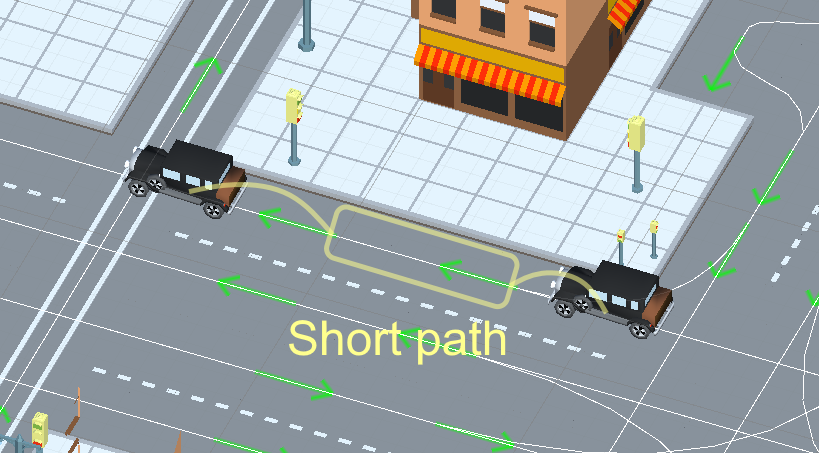
Short path length : if the next path is too short, start checking the next connected paths for obstacles (example).
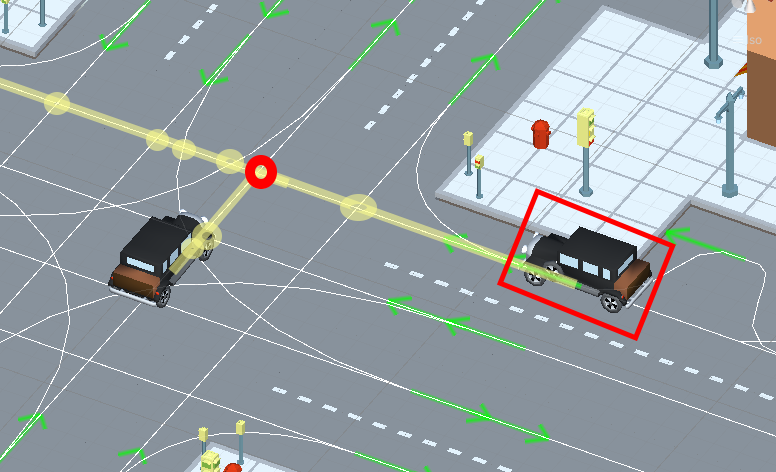
Calculate distance to intersect point : distance to intersected paths when they are checked for obstacles (example) (test scene).
Obstacle intersect calculation method: method of calculating the intersection of the vehicle and the intersect point.
  • Distance : distance between car and intersect point.

  • Bounds : calculate intersect point that inside the car bounds.

Size offset to intersect point : additional offset to the length of the car bounds to check the closeness to the intersect point (test scene).
Close enough distance to stop before intersect point : car is close enough to stop in front of the intersect point if necessary (example) (test scene).
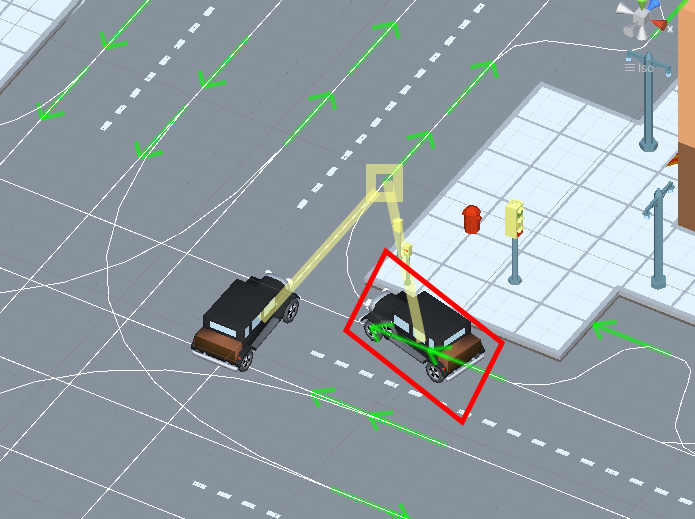
Close enough distance to stop before intersect same target node : current car is close enough to stop in front if another car approaches the same target node but with a higher priority (example) (test scene).
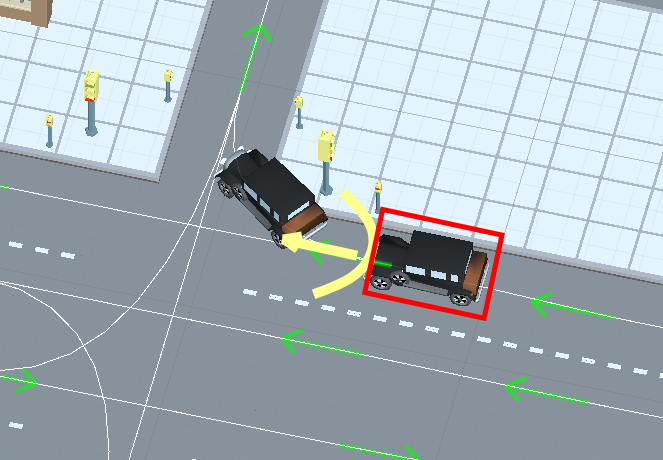
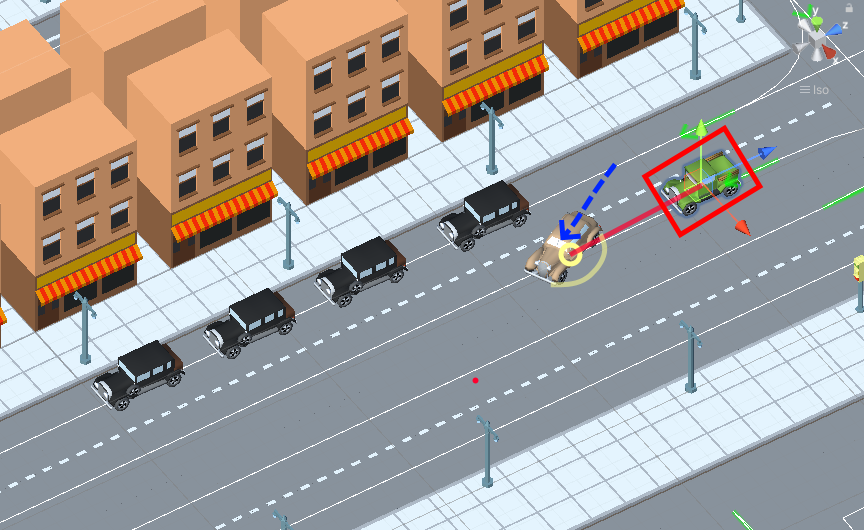
Close distance to change lane point : car that is too close to the lane change point is always an obstacle (example) (test scene).
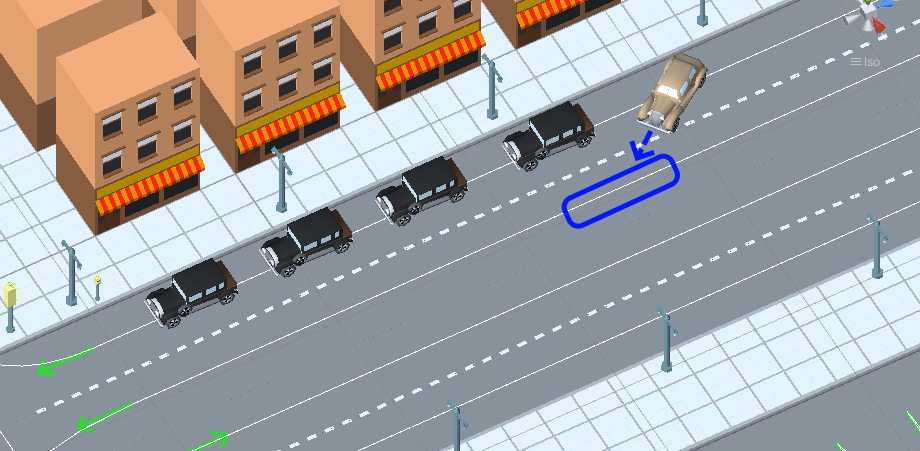
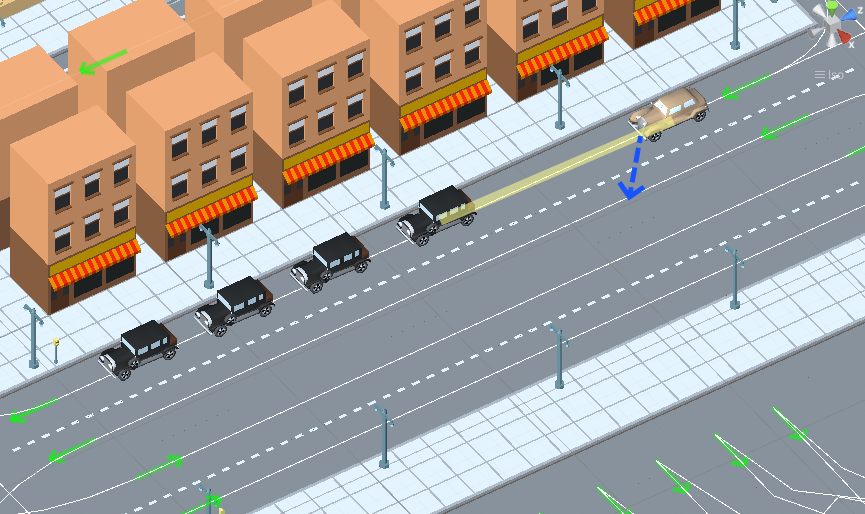
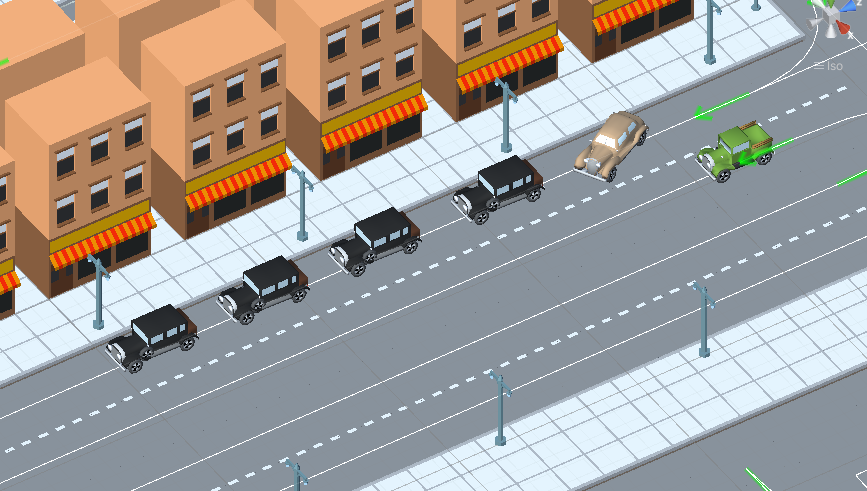
Max distance to obstacle change lane : maximum distance to the obstacle in the target change lane (example).
Same direction value : direction of the vehicle to check for obstacles in neighboring paths (paths that start from the same point)(example).
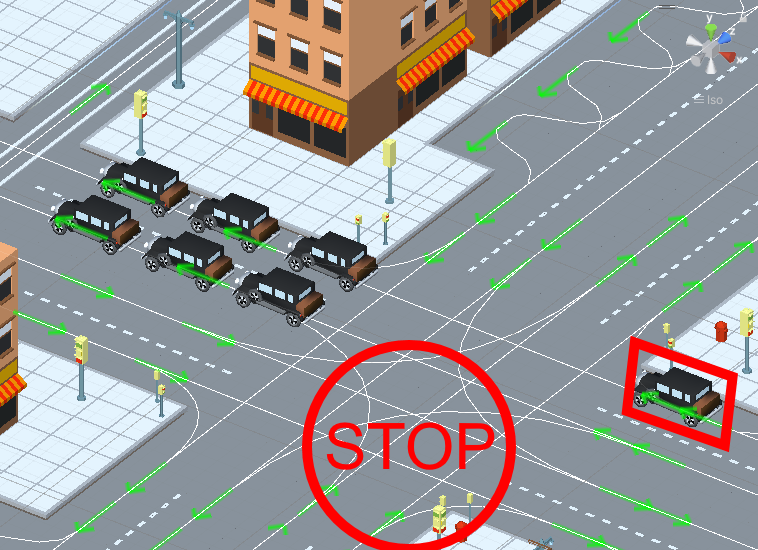
Avoid crossroad jam : car doesn’t enter an crossroad if it cannot pass it without jamming (example) (test scene).

Note

How to calculate the parameters relative to the size of the vehicle hull:
  • Select the mesh renderer of the vehicle hull and insert to the Target Car Mesh field.

  • Press Recalculate button.

  • On the traffic test scene, calibrate the parameters depending on your needs.

Parameter visualization:
_images/ObstacleDistanceExample1.png

Obstacle distance example.

_images/ApproachDistanceExample1.png

Approach distance example.

_images/MinDistanceToCheckNextConnectedPathExample.png

Min distance to check next ConnectedPath example.
_images/CheckShortPathExample.png

Short path example.

_images/CalculateDistanceToIntersectExample1.png

Calculate distance to intersect example.
_images/CalculateDistanceToIntersectSameTargetExample1.png

Calculate distance to intersect same target example.
_images/ChangeLaneCloseDistanceExample.png

Change lane close distance to point example.
_images/ChangeLaneExample1.png

Maximum distance to the obstacle in the target change lane example.
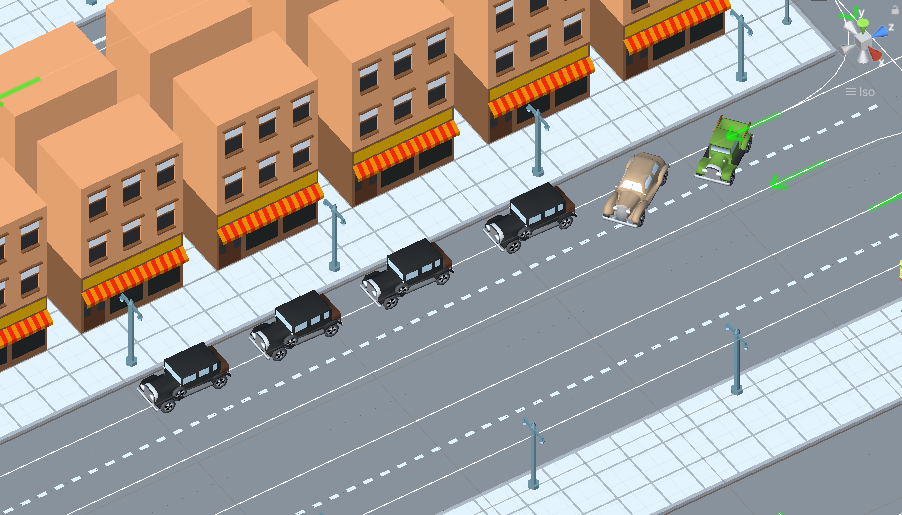
_images/ChangeLaneExample3.png

Short path example.

_images/SameDirectionExample.png

Same direction example.

_images/AvoidCrossroadJamExample.png

Avoid crossroad jam example.

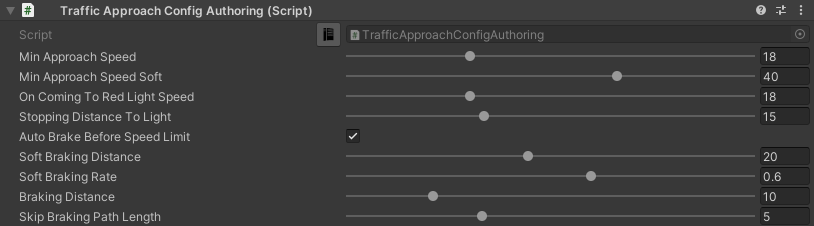
Traffic Approach Config

Config of approaching obstacles and lights (test scene).
_images/TrafficCarApproachConfig.png

Hub/Configs/TrafficCarConfigs/ApproachConfig

Min approach speed : min approach speed.
Min approach speed soft : min approach speed soft at the long distance to obstacle.
On coming to the red light speed : slowing down the speed of the car when approaching a red light (if the segment speed limit is lower or the speed of the obstacles is lower, the lowest speed of all the conditions will be selected).
Stopping distance to light : distance at which the car slows down.

Auto brake before speed limit

The car automatically brakes to the new speed limit at the selected distance.

Soft braking distance : soft braking distance to new speed limit.
Soft braking rate : soft braking rate when the car is at a soft distance (if it is closer soft distance than the default braking rate).
Braking distance : braking distance to new speed limit.
Skip braking path length distance : if the next path is too short, the next one is selected.

Note

Approach distance set in Traffic obstacle config.

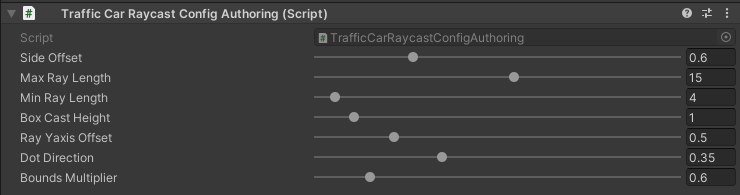
Traffic Raycast Config

Traffic raycast Config (TrafficDetectObstacleMode raycast or hybrid should be enabled) (debug example) (more info).
_images/TrafficCarRaycastConfig.png

Hub/Configs/TrafficCarConfigs/RaycastConfig

Side offset : width of raycast box.
Min/Max ray length : lenght of raycast box.
Boxcast height : height raycast box.
Ray Y axis offset : y-offset position box.
Dot direction : if the raycast is set to Hybrid mode than only those targets that are in front of the car with the set dot parameter will be raycasted.
Bounds multiplier : value by which the bounds is multiplied.

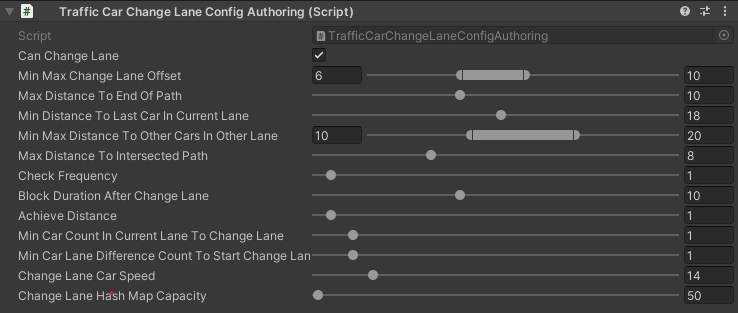
Traffic Change Lane Config

Config for automatic calculation of lane change by traffic (works for paths with the Straight road road type only) (test scene).
_images/TrafficCarChangeLaneConfig.png

Hub/Configs/TrafficCarConfigs/ChangeLaneConfig

Can change lane : on/off ability to change lanes.
Min max change lane offset : min/max offset in the target lane depending on the speed of the car. (example)
Max distance to end of path : maximum distance before the end of a current path at which car can change lanes.
Min distance to last car in current lane : minimum distance to the last car in the current lane. (example)
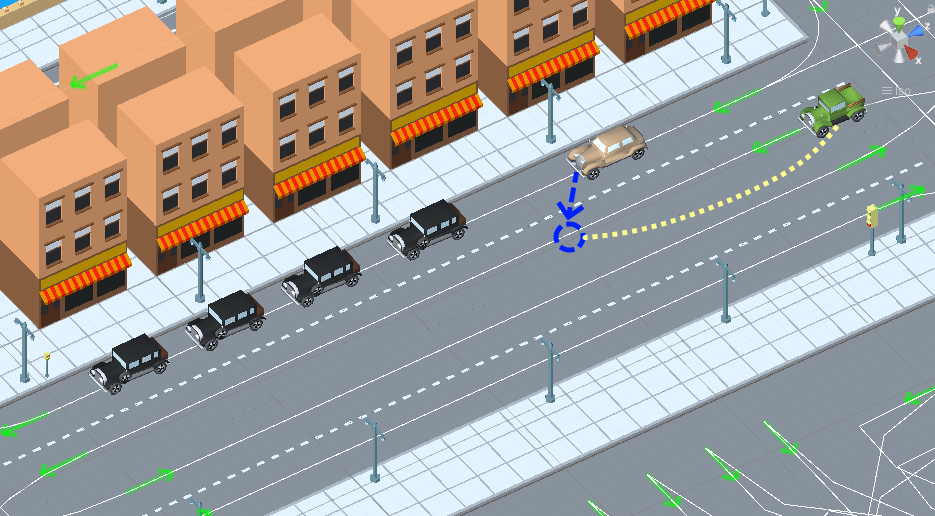
Min Max distance to other cars in other lane : distance to the car in the target lane, the distance is chosen based on the current speed of the calculated car (lerp between 0 speed and max speed of the car (60 km/h by default)) (example)
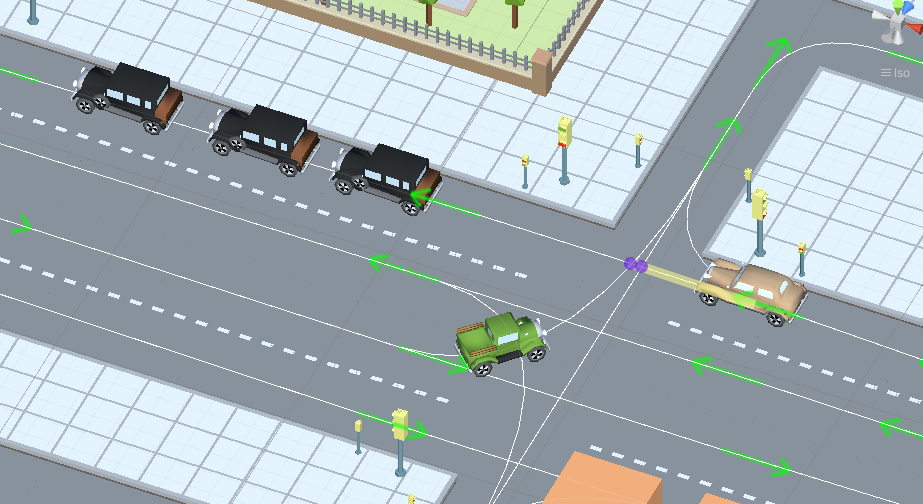
Max distance to intersected path : distance to the crossing, if the car is close to the crossing, the ability to change lanes is disabled. (example)
Check frequency : frequency of lane change calculation.
Block duration after change lane : blocking the ability to change lanes after a lane change has been performed.
Achieve distance : distance to achieve the target lane point.
Min car count in current lane to change lane : minimum number of cars in the current lane to change lanes.
Min car lane difference count to start change lane : minimum car difference in the nearest lane to change lanes.
Change lane car speed : lane change speed.
Change lane HashMap capacity : initial capacity hashmap containing data about cars that change lanes.

Parameter visualization:

_images/MinMaxChangeLaneOffsetExample.png

Min/max change lane offset example.

_images/MinDistanceToLastCarExample.png

Min distance to last car in current lane example.
_images/MinDistanceToOtherCarsInOtherLaneExample.png

Min distance to other cars in other lane example.
_images/MinDistanceToIntersectedPathExample.png

Min distance to intersected path example.

Traffic Npc Obstacle Config

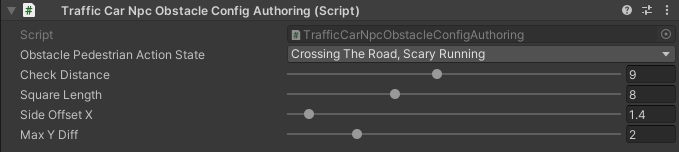
Config to calculate npc obstacles (example).
_images/TrafficCarNpcObstacleConfig.png

Hub/Configs/TrafficCarConfigs/NpcObstacleConfig

Check distance : obstacle calculation length.
Square length : length of the obstacle calculation square.
Side offset X : width of the obstacle calculation square.
Max Y diff : maximum difference in Y-axis position between the car and the npc.

Traffic Antistuck Config

Config to culling car in case of stuckness.

_images/TrafficCarAntistuckConfig.png

Hub/Configs/TrafficCarConfigs/AntistuckConfig

Obstacle stuck time : duration of sighting of the obstacle after which the car will be culled.
Stuck distance difference : if the car moved more than the parameter distance the Obstacle stuck time is reset.
Cull of out the camera only : car will be culled only if it is out of the camera’s range of vision.

Traffic Horn Config

Config to sound random horns when an obstacle is detected. It can be disabled (here).

_images/TrafficCarHornConfig.png

Hub/Configs/TrafficCarConfigs/HornConfig

Chance to start : chance to start the horn.
Idle time to start : idle time to start the horn.
Delay : delay between horns.
Horn duration : horn duration.

Traffic NavMesh Loader Config

Config to load Navmesh obstacles for traffic.

_images/TrafficNavMeshLoaderConfig.png

Hub/Configs/TrafficCarConfigs/TrafficNavMeshLoaderConfig

Size offset : size offset of loaded NavMeshObstacle.
Load only view : load NavMeshObstacle in view of camera only.
Load frequency : load frequency of NavMeshObstacle for the car.

Note

Traffic Avoidance Config

Config of traffic avoidance.

_images/TrafficAvoidanceConfig.png

Hub/Configs/TrafficCarConfigs/AvoidanceConfig

Custom achieve distance : custom achieve distance of avoidance point.
Resolve cyclic obstacle : overcome the cyclical obstacle of cars getting stuck in each other.

Traffic Custom Destination Config

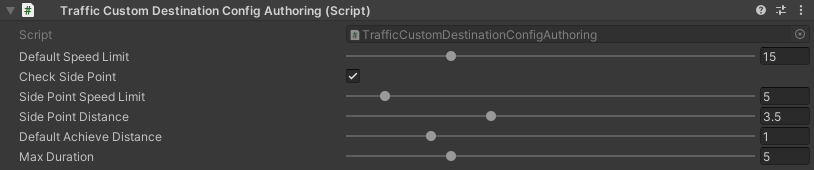
Config for custom destination of the vehicles. Also used by traffic avoidance.
_images/TrafficCustomDestinationConfig.png

Hub/Configs/TrafficCarConfigs/CustomDestinationConfig

Default speed limit : default speed limit for custom destination (if user doesn’t set custom).
Check side point : check that the destination is on the side of the car.
Side point speed limit : custom speed limit when destination is at side point.
Side point distance : distance to side point.
Default achieve distance : achieve distance of destination point.
Max duration : max duration of custom destination state enabled.

Traffic Rail Config

Config for rail movement of the vehicles.

_images/TrafficRailConfig.png

Hub/Configs/TrafficCarConfigs/RailConfig

Max distance to rail line : maximum distance between the rail and the vehicle.
Lateral speed : lateral speed of the vehicle to align with the rail.
Rotating lerp speed : rotation lerp speed.
Lerp rotation tram : on/off rotating lerp for tram.
Lerp rotation traffic : on/off rotating lerp for default traffic.

Traffic Collision Config

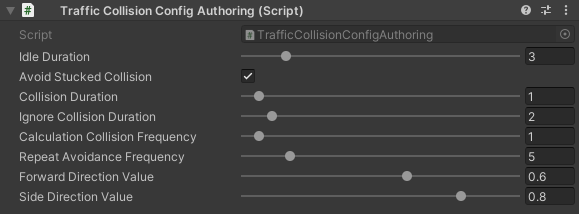
The config is used in a two-car collision.
_images/TrafficCollisionConfig.png

Hub/Configs/TrafficCarConfigs/CollisionConfig

Idle duration : idling time after collision with other vehicle.
Avoid stucked collision : attempt to avoid a stuck collision vehicle.
Collision duration : collision time with vehicle to start avoidance.
Ignore collision duration : duration of collision ignoring since last event.
Calculation collision frequency : calculation frequency of the avoidance.
Repeat avoidance frequency : frequency of collision avoidance attempts.
Forward direction value : dot value of the direction of the colliding vehicles along the Z axis.
Side direction value : dot value of the direction of the colliding vehicles along the X axis.

Traffic Behavior Config

Config for setting different driving styles.

Tailgate rate : Tailgate rate. used with Traffic Obstacle Config MaxDistanceToObstacle = MaxDistanceToObstacle * TailgateRate.
Acceleration rate : input acceleration speed.
Speeding rate : degree of deviation from the speed limit.
Idle input duration : idle time before starting movement.
Random change lane duration : frequency of random lane changes.
Approach distance rate : approach distance rate. Used with Traffic Obstacle Config ApproachDistance = ApproachDistance * ApproachDistanceRate.
Approach distance rate soft : approach distance rate soft. Used with Traffic Obstacle Config ApproachDistanceSoft = ApproachDistanceSoft * ApproachDistanceRateSoft.