Player Character
Hybrid DOTS
The player character behaviour is handled by the DOTS systems.
How To Create
Add an Animator component to your character if it’s missing & assign a PlayerBaseController if you want to use project animations.
Add all required components to your character from the list below.
Create a new ID in the enum NpcId.cs file.
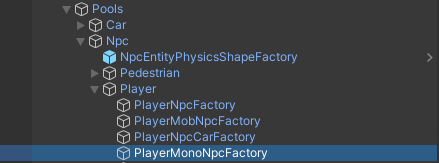
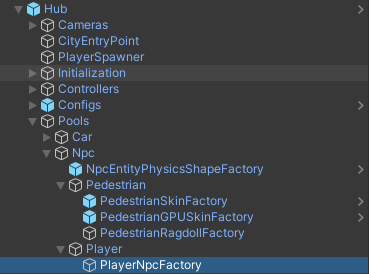
Add the result to the PlayerNpcFactory.
Make sure that NPC & Hybrid DOTS are selected in the PlayerSpawner.
Select your character from the list in the PlayerSpawner.
Components

Player actor : camera tracking component [required].
Npc behaviour entity : holds reference to bind entity & read input from DOTS entity world, also controls animator & npc weapon behaviour [required].
Npc weapon holder : reference to the anchor bone that holds the weapon & reference to the weapon.
Npc hit reaction behaviour : behaviour that handles the reaction to a bullet hit.
Ragdoll base : activates Ragdoll when the NPC dies.
Npc health entity behaviour : wrapper for entity health in the Monobehaviour world.
Note
- Spawned by PlayerSpawner.

- Entity movement controlled by systems:
NpcControllerSystem.
NpcGroundStateSystem.
NpcRaycastGroundSystem.
NpcFreezeVerticalRotationSystem.
Gangster outside Player is example prefab.
Factory
Factory that contains player Hybrid DOTS NPCs.
Hybrid Mono
The player character behaviour is handled by the mono controller.
How To Create
Set the World simulation type to Hybrid mono in the General settings config.
Add animator to your model & assign PlayerBaseController into the controller field.
Add all required components to your character from the list below.
Add the result to the PlayerHybridMonoFactory.
Make sure that NPC & Hybrid Mono are selected in the PlayerSpawner.
Select your character from the list in the PlayerSpawner.
Note
Demo Mono scene & Gangster Mono outside Player prefab are examples.
Components
Player actor : camera tracking component [required].
Character controller : default unity component [required].
Npc motion behaviour : component that handles NPC behaviour [required].
Player npc input behaviour : contains input from the player [required].
Npc weapon holder : reference to the anchor bone that holds the weapon & reference to the weapon.
Npc hit reaction behaviour : behaviour that handles the reaction to a bullet hit.
Ragdoll base : activates Ragdoll when the NPC dies.
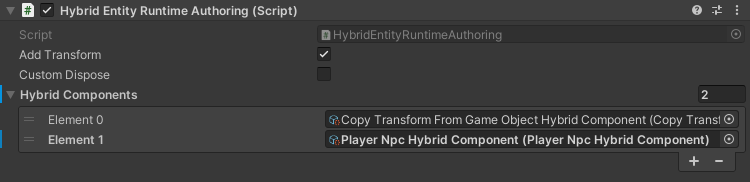
Hybrid entity runtime authoring : automatically load the entity on enable at runtime for this gameobject. [required].
Npc health behaviour : health component.
Factory
Factory that contains player Hybrid Mono NPCs.