Custom Camera
Info
If you want to add your own camera solution, follow these steps:
Steps
Create a new MonoBehaviour script & implement the class that derived from CameraBase & add it to the root of your custom camera (the code example in the Code Example section below).
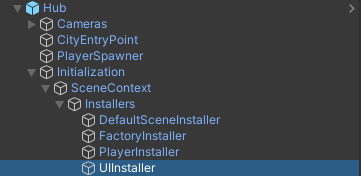
Find the UIInstaller object on the scene.
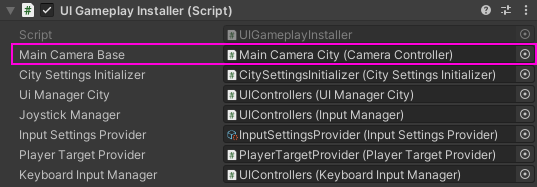
Assign the new camera to the Main Camera Base field.
Create a Cull point child for the new camera by adding a CullPointRuntimeAuthoring to the new gameobject.
Make sure you have deleted or disabled the old camera.
Code example
    // The new MonoBehaviour script that derived from 'CameraBase'
public class ExampleCamera : CameraBase
{
            // Your own camera solution example
    public vThirdPersonCamera cam;

            // Injecting PlayerActorTracker via Zenject (mandatory code)
    [Inject]
    public override void Construct(PlayerActorTracker playerActorTracker)
    {
        base.Construct(playerActorTracker);
    }

            // Override this event method to set target for your custom camera, pseudo code example:
    protected override void PlayerActorTracker_OnSwitchActor(Transform newPlayerActor)
    {
                    // Set the player transform target
        cam.SetTarget(newPlayerActor);
    }
}